The Pomodoro Technique Explained: Why One Size Does Not Fit All
Finding the motivation to start a big project can feel impossible. We often look at a massive to-do list and immediately feel overwhelmed. This is where the Pomodoro technique comes in.
The Pomodoro technique is one of the most popular productivity methods in the world. It is incredibly simple to learn and works perfectly for students, freelancers, and remote workers.
What is the Pomodoro Technique?
At its core, the Pomodoro technique is just a way to break your time into smaller blocks. You focus completely on one task for a set amount of time. When the timer rings, you take a short break. After completing a few of these cycles, you take a longer break.
The classic version of this method looks like this:
Work for 25 minutes.
Take a 5-minute break.
Repeat this four times.
Take a longer 15-minute break.
Why Does It Work So Well?
This method works because it tricks your brain. When you tell yourself you have to work for four hours straight, your brain resists. It sounds too hard. But if you tell yourself you only have to work for 25 minutes, it feels much easier to begin.
It also prevents burnout. The short breaks give your mind a chance to rest and reset. This keeps your energy levels high throughout the entire day.
The Problem with the Classic Pomodoro
The 25-minute timer is famous for a reason, but it has one major flaw. It does not work for every type of task.
If you are replying to emails or doing quick chores, 25 minutes is perfect. But what if you are writing a complex essay or programming a new app? Just as you get into a state of deep focus, the 25-minute timer rings and breaks your concentration.
Different tasks require different levels of focus. You need a timer that adapts to your actual workflow.
How Syncmodo Solves This
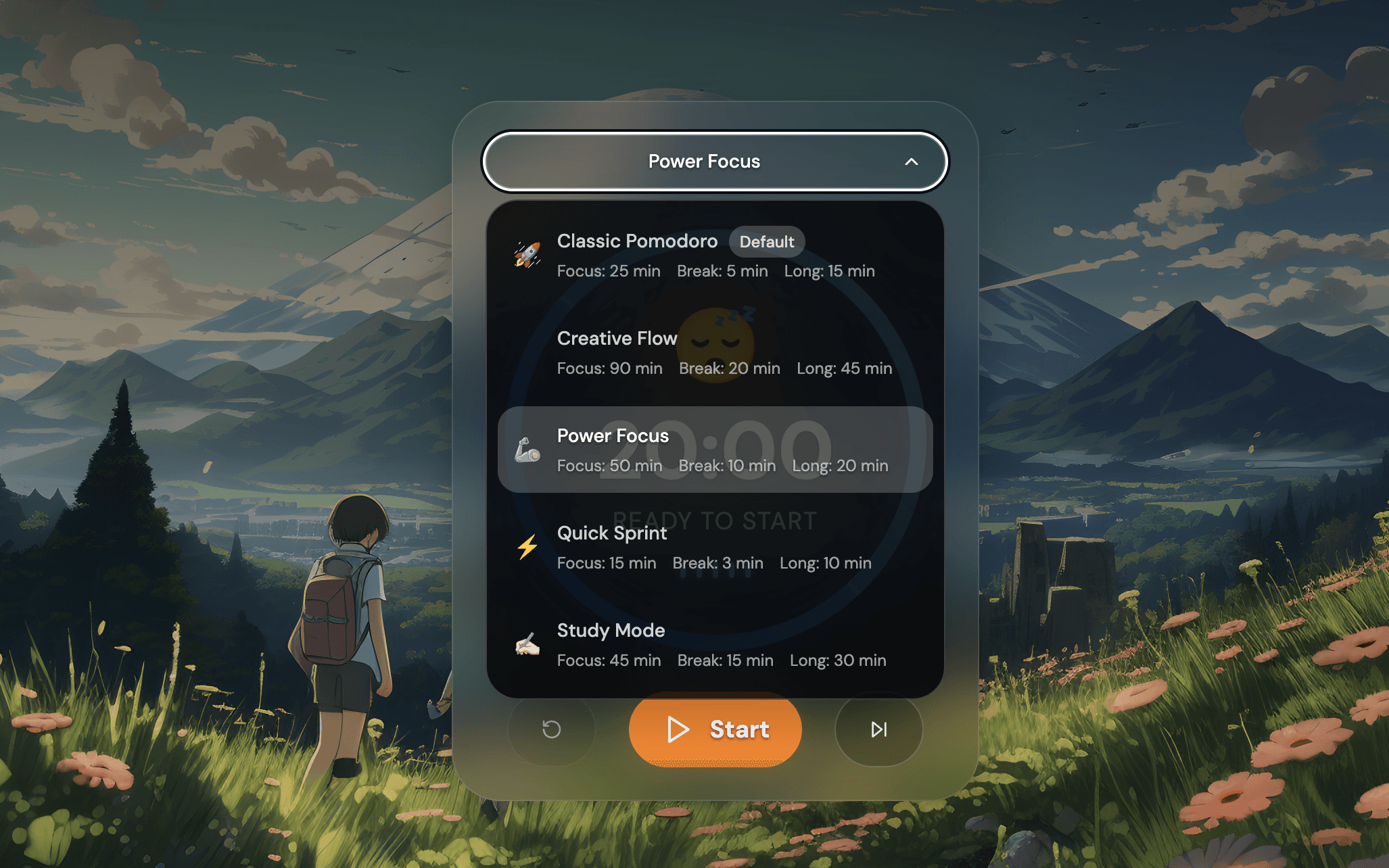
We noticed that people were struggling to adjust their timers for different types of work. That is why we built custom focus templates directly into Syncmodo.
Instead of manually changing your timer settings every time you switch tasks, you can just click on a template that fits your current goal.
Here are the templates you can choose from in Syncmodo right now:
1. Classic Pomodoro
Focus: 25 min | Break: 5 min | Long Break: 15 min
Best for: Clearing out your inbox, doing daily admin tasks, or starting something you have been avoiding.
2. Power Focus
Focus: 50 min | Break: 10 min | Long Break: 20 min
Best for: Deep work sessions. This gives you enough time to get into a flow state without sitting still for too long.
3. Creative Flow
Focus: 90 min | Break: 20 min | Long Break: 45 min
Best for: Coding, graphic design, and long-form writing. This template matches the natural rhythm of the human brain for intense creative work.
4. Study Mode
Focus: 45 min | Break: 15 min | Long Break: 30 min
Best for: Students reviewing notes or reading textbooks. The slightly longer breaks help your brain absorb new information.
5. Quick Sprint
Focus: 15 min | Break: 3 min | Long Break: 10 min
Best for: Micro-tasks. Use this when you have low energy or when you just need to tidy up your desk before a meeting.
Find Your Perfect Rhythm
You do not have to force yourself into a 25-minute box if it does not work for you. The best productivity system is the one that actually fits your life.
If you want to try these customized focus templates in a beautiful distraction-free environment, come start a session on Syncmodo today. Pick your template, hit start, and let the timer do the heavy lifting for you.